USE databasename
GO
declare @procName sysname
declare someCursor cursor for
select name from sysobjects where type = 'P' and objectproperty(id, 'IsMSShipped') = 0
open someCursor
fetch next from someCursor into @procName
while @@FETCH_STATUS = 0
begin
exec('drop proc ' + @procName)
fetch next from someCursor into @procName
end
close someCursor
deallocate someCursor
go
Monday, April 18, 2011

Wednesday, April 13, 2011
Windows Azure basics and its uses
Introduction
Windows azure is cloud computing OS. It mainly contains three components namely windows azure, windows Fabric and Windows azure SQL. It can be compared with cloud computing provided by Amazon but there are some basic difference with Amazon cloud computing. Amazon has provided basic platform for cloud computing but Microsoft Azure has provided basic platform along with basic services so developer can focus only their task rather than peripheral areas.
Areas of windows azure are:
- Web roles, data storage, worker role
Window azure – compute and storage in the cloud
SQL Azure – relational database in the cloud
.Net Services – Web based services e.g. Connectivity and access control
http://azure.snagy.name/blog/?p=176
http://azure.snagy.name/blog/?p=26
Download SDK for visual studio
http://www.microsoft.com/windowsazure/getstarted/default.aspx
Get Free Test Windows Azure server
For one month without credit card information
http://www.windowsazurepass.com/?campid=9FE3DB53-E4F0-DF11-B2EA-001F29C6FB82
Free subscription up to June
http://www.microsoft.com/windowsazure/free-trial/
How to create self assigned certificate for Windows Azure portal
1. Load the IIS 7 management console. I’m assuming here you have IIS7 installed since its required for the Windows Azure SDK.
2. Click on your Server.
3. Double Click Server Certificates in the IIS Section in the main panel.
4. Click Create Self-Signed Certificate… in the Actions panel.
5. Give it a Friendly Name.
6. Close IIS Manager.
7. Open Certificate Manager (Start->Run->certmgr.msc)
8. Open Trusted Root Certification Authorities, then Certificates.
9. Look for your certificate (Tip: Look in the Friendly Name column).
10. Right Click your certificate, then choose All Tasks, then Export…
11. In the Wizard, choose No, do not export the private key, then choose the DER file format.
12. Give your cert a name. (remember to call it something.cer).
13. Navigate to the Windows Azure Portal – http://windows.azure.com
14. Click the Account Tab, then click Manage My API Certificates.
15. Browse to the certificate file you created earlier and upload it.
16. Done!
(Ref: http://www.davidaiken.com/2009/12/21/how-to-create-a-x509-certificate-for-the-windows-azure-management-api/ )
Windows migration wizard from SQL Server to SQL Azure
http://sqlazuremw.codeplex.com/releases/view/32334
(download and run its exe file)
Connect SQL Azure via SQL Server management studio
Use the same way as in SQL server
1. Server name: Azure server name
2. Username: SQL azure user name
3. Password: SQL azure password
4. Use TCP/IP protocol, and put specific database name extending option of login window
OPENXML() and Nodes()
SQL Azure does not support OPENXML() but we have better alternative of it. Nodes() is good alternative.
Example:
DECLARE @xml xml
SET @xml = N'
SELECT
doc.col.value('Key[1]', 'NVARCHAR(200)') ponumber,
doc.col.value('Val[1]', 'NVARCHAR(MAX)') podate
FROM @xml.nodes('Parameter/Collection/Row') doc(col)
Sunday, August 29, 2010
jQuery examples
jQuery is a collection library having different functionality in Java Script. It can be used with any type of server side scripting language like PHP, ASP, JSP, Perl etc..
see examples where you can use jQuery
1. Menu bar using jQuery Online example and Code
2. Post data check and message
online example and
Code
3 Over all functionality of jQuery can be seen in this tutorial
see examples where you can use jQuery
1. Menu bar using jQuery Online example and Code
2. Post data check and message
online example and
Code
3 Over all functionality of jQuery can be seen in this tutorial
Friday, August 27, 2010
LAMP --- Linux-Apache-Mysql-PHP(Perl/Python)
LAMP is an abbreviation of Linux, Apache, Mysql and PHP or Pern or Python. It a complete package for developing web application. Whole package is available in internet with free of cost. It is a open source software package.
where,
Linux- operating system highly secured operating system
MySQL- Database management system owned by oracle corporation
Apachee- HTTP web server
PHP - Hypertext pre-processor a server side scripting language.(available in object oriented form also)
For window plat form LAMP is called as WAMP where w for windows
You can download LAMP via this link
CLICK
And Link for downloading WAMP is
CLICK
where,
Linux- operating system highly secured operating system
MySQL- Database management system owned by oracle corporation
Apachee- HTTP web server
PHP - Hypertext pre-processor a server side scripting language.(available in object oriented form also)
For window plat form LAMP is called as WAMP where w for windows
You can download LAMP via this link
CLICK
And Link for downloading WAMP is
CLICK
Thursday, August 26, 2010
DOM, Java Script, jQuery
Code written in HTML, DHTML and XML is changed in sequence of objects for interoperability and further processing propose this sequence object is called DOM(Document Object Model). HTML do not need the sequence of Objects but JavaScript needs sequence of objects to indentify each tag and data of html or xml or dhtml.
so java script can process html, xml, dhtml data in client side dynamically. Java script is a client side scripting language for DOM objects.
jQuery is a collection of java script library. It is developed on basis of Java script and It also used for representing DOM objects and other functioning like creating animation, handeling events and develop Ajax applications.
so java script can process html, xml, dhtml data in client side dynamically. Java script is a client side scripting language for DOM objects.
jQuery is a collection of java script library. It is developed on basis of Java script and It also used for representing DOM objects and other functioning like creating animation, handeling events and develop Ajax applications.
Tuesday, July 27, 2010
How to add new user in sql server management studio 2008
Hei guys,
I was also suffering from this problem and finally I got succeeded so i am sharing my experience here.
Steps:
(This is a experience of doing it in windows 7 but should work in xp, vista and 2000 as well)
1. Open SQL management studio and log in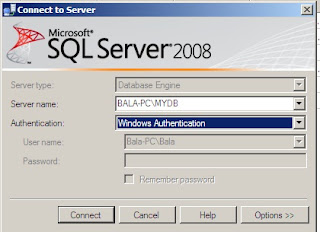
first as windows authentication mode.
(choose proper server name in which you want to add user)
as shown in figure
2. Extend security folder content which is located in right side if window. Rig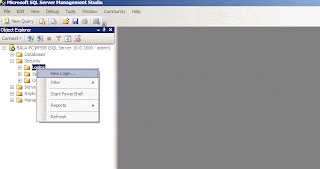 ht click on login tab (as shown in figure) and add new user.
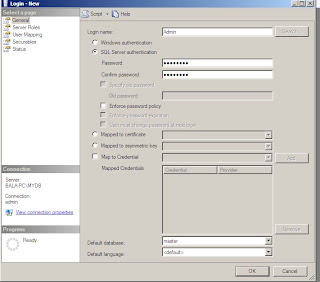
3. put login name, click radio button to SQL Authencation,
put password
uncheck enforce password policy and select database as master as shown in figure
4. click on user mapping tab and click on master database and make it owner of database as shown in figure.
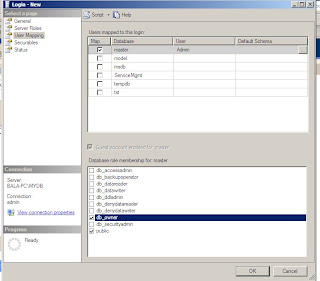
5. Now you completed the process click ok and restart computer then try to login with your new user account. For sure it will work.
If you have any problem please feel free to ask me :)
Thank you
mebalkrishna@gmail.com
I was also suffering from this problem and finally I got succeeded so i am sharing my experience here.
Steps:
(This is a experience of doing it in windows 7 but should work in xp, vista and 2000 as well)
1. Open SQL management studio and log in

first as windows authentication mode.
(choose proper server name in which you want to add user)
as shown in figure
2. Extend security folder content which is located in right side if window. Rig
 ht click on login tab (as shown in figure) and add new user.

3. put login name, click radio button to SQL Authencation,
put password
uncheck enforce password policy and select database as master as shown in figure
4. click on user mapping tab and click on master database and make it owner of database as shown in figure.

5. Now you completed the process click ok and restart computer then try to login with your new user account. For sure it will work.
If you have any problem please feel free to ask me :)
Thank you
mebalkrishna@gmail.com
Tuesday, July 20, 2010
Difference between Stack and Heap
Stack
It used by value type. It can store fixed amout of data and stored in RAM.
Stack is used by Int, Array, Enumerator, Struct. Memory management is automatically done by program so we dont need to create desctructor.
Heap
It is Used by reference type. It has unlimited size. Data whose size can not be determined before execution of program and need to allocate dynamically in run time are fall in this category. For example if we need to read data of file then it may have any size so this type of date are stored in heap. It is stored in secondary memory i.e. harddisk.
String, Classes use heap for storing data. Program doesnot about memory status of heap so programmar him/herself need to destruct it.
It used by value type. It can store fixed amout of data and stored in RAM.
Stack is used by Int, Array, Enumerator, Struct. Memory management is automatically done by program so we dont need to create desctructor.
Heap
It is Used by reference type. It has unlimited size. Data whose size can not be determined before execution of program and need to allocate dynamically in run time are fall in this category. For example if we need to read data of file then it may have any size so this type of date are stored in heap. It is stored in secondary memory i.e. harddisk.
String, Classes use heap for storing data. Program doesnot about memory status of heap so programmar him/herself need to destruct it.
Sunday, June 28, 2009
Consuming WCF Services hosted in IIS7
To consume services we should conform before that whether there is services or not.
If Wcf services test it before using it with the command 'testwcfclient' along with hosted service path.
first.
1. Add the new website on the builded project and choose ASP.NET website Template
and Give appropriate name as you want.
2. Add reference of service which is hosted in IIS7 by clicking on "service reference"from add reference.
2. make simple asp page to access the services and write some code on .cs file of that page.
3. Dont forget to add reference in .cs page
eg. using ServiceReference1;
4. call services and use its function as in other class and object.
eg. MyCalculatorClient client = new MyCalculatorClient();
here MyCalulator is service name:
5. after writing some code to consume services, build the whole solution and then view the project on browser.
new page will be open in browser and you can use that service by putting the value and accessing result.
Thus you can use the WCF services hosted in II7.
If Wcf services test it before using it with the command 'testwcfclient' along with hosted service path.
first.
1. Add the new website on the builded project and choose ASP.NET website Template
and Give appropriate name as you want.
2. Add reference of service which is hosted in IIS7 by clicking on "service reference"from add reference.
2. make simple asp page to access the services and write some code on .cs file of that page.
3. Dont forget to add reference in .cs page
eg. using ServiceReference1;
4. call services and use its function as in other class and object.
eg. MyCalculatorClient client = new MyCalculatorClient();
here MyCalulator is service name:
5. after writing some code to consume services, build the whole solution and then view the project on browser.
new page will be open in browser and you can use that service by putting the value and accessing result.
Thus you can use the WCF services hosted in II7.
Thursday, June 25, 2009
Difference between string and String in C#
There is such difference in string and String. These can be apply for the same purpose. The only difference between these is String can be used as identifier but string can not.
Monday, May 18, 2009
System.ServiceModel.EndpointNotFoundException: Could not connect
Problem ( Took 2 days to Solve)
When You try to consume Self-hosted WCf services from Windows From in VS 2008. You might get this error quite often...
System.ServiceModel.EndpointNotFoundException: Could not connect to http://localhost:8731/Design_Time_Addresses/MyCalculatorService/MyCalculatorService/. TCP error code 10061: No connection could be made because the target machine actively refused it 127.0.0.1:8731. ---> System.Net.WebException: Unable to connect to the remote server --->
This error is due to the Behavior of WCF service. You need to make Singleton instance of that WCF Service.
so You need to add following code before start of Service Class in Service file.
[ServiceBehavior(InstanceContextMode = InstanceContextMode.Single)]
and again build service or whole solution and Run the Windows From then You get the answer.
Thank You.
When You try to consume Self-hosted WCf services from Windows From in VS 2008. You might get this error quite often...
System.ServiceModel.EndpointNotFoundException: Could not connect to http://localhost:8731/Design_Time_Addresses/MyCalculatorService/MyCalculatorService/. TCP error code 10061: No connection could be made because the target machine actively refused it 127.0.0.1:8731. ---> System.Net.WebException: Unable to connect to the remote server --->
This error is due to the Behavior of WCF service. You need to make Singleton instance of that WCF Service.
so You need to add following code before start of Service Class in Service file.
[ServiceBehavior(InstanceContextMode = InstanceContextMode.Single)]
and again build service or whole solution and Run the Windows From then You get the answer.
Thank You.
Saturday, May 16, 2009
Client program to consume Selfhosted WCF Services in Microsoft Visual Studio 2008
1. add new project by Right clicking on Solution
2. go to Windows tab
3. select Console Application then give some name for consuming name: e.g. CalCAreaClient then click ok.
4. Add System.ServiceModel as reference and also Add WCF Service as a Project reference
5. add using System.ServiceModel; on the program.cs
6. Add service Reference, and discover the service and add it.
7. Add that service reference on the code eg.
using CalcAreaClient.ServiceReference1;
8. Create proxy to access service.
eg.
namespace CalcAreaClient
{
class Program
{
static void Main(string[] args)
{
try
{
CalcAreaWcfServiceClient proxy = new CalcAreaWcfServiceClient();
double calcVal = proxy.CalcAreaSquare(5);
Console.WriteLine("Area of Square = {0}", calcVal);
Console.WriteLine("Press enter to terminate client");
Console.ReadLine();
}
catch (Exception e) {
Console.WriteLine("Error on client program");
Console.WriteLine("error {0}", e);
Console.ReadLine();
}
}
}
}
i thinkall te createria is fulfill. Now just run the serviceHost program first and then build this client program.
from visual studio command promt which is diffferent than normal command promt.
2. go to Windows tab
3. select Console Application then give some name for consuming name: e.g. CalCAreaClient then click ok.
4. Add System.ServiceModel as reference and also Add WCF Service as a Project reference
5. add using System.ServiceModel; on the program.cs
6. Add service Reference, and discover the service and add it.
7. Add that service reference on the code eg.
using CalcAreaClient.ServiceReference1;
8. Create proxy to access service.
eg.
namespace CalcAreaClient
{
class Program
{
static void Main(string[] args)
{
try
{
CalcAreaWcfServiceClient proxy = new CalcAreaWcfServiceClient();
double calcVal = proxy.CalcAreaSquare(5);
Console.WriteLine("Area of Square = {0}", calcVal);
Console.WriteLine("Press enter to terminate client");
Console.ReadLine();
}
catch (Exception e) {
Console.WriteLine("Error on client program");
Console.WriteLine("error {0}", e);
Console.ReadLine();
}
}
}
}
i thinkall te createria is fulfill. Now just run the serviceHost program first and then build this client program.
from visual studio command promt which is diffferent than normal command promt.
Selfhosting of WCF Services in Microsoft Visual Studio 2008
1. add new project by Right clicking on Solution
2. go to Windows tab
3. select Console Application then give some name for selfhosting name: e.g. CalCAreaWcf then click ok.
4. Add System.ServiceModel as reference and also Add WCF Service as a Project reference
5. add using System.ServiceModel; on the program.cs
6. copy App.Config file from Wcf Service folder to this folder
7. Write some code in program.cs for hosting service
you can write like this:
namespace CalcAreaWcf
{
class Program
{
static void Main(string[] args)
{
try{
ServiceHost CalculatingAreaService = new ServiceHost(typeof(CalcAreaWcfService));
CalculatingAreaService.Open();
Console.WriteLine("Cheers!!! Service is Running, Press Enter to close Serive");
Console.ReadLine();
CalculatingAreaService.Close();
}
catch(Exception e){
Console.WriteLine("Problem occur");
Console.WriteLine("Error {0}", e);
Console.ReadLine();
}
}
}
}
Now everything is done. You need to build the hostingservice by Rclicking on Hosting file.
I thing, now service is build u can go and see it from Command prompt of respective project location
projectfile\bin\debug\CalculatingAreaService.exe
Hurrey! Service is Running....
2. go to Windows tab
3. select Console Application then give some name for selfhosting name: e.g. CalCAreaWcf then click ok.
4. Add System.ServiceModel as reference and also Add WCF Service as a Project reference
5. add using System.ServiceModel; on the program.cs
6. copy App.Config file from Wcf Service folder to this folder
7. Write some code in program.cs for hosting service
you can write like this:
namespace CalcAreaWcf
{
class Program
{
static void Main(string[] args)
{
try{
ServiceHost CalculatingAreaService = new ServiceHost(typeof(CalcAreaWcfService));
CalculatingAreaService.Open();
Console.WriteLine("Cheers!!! Service is Running, Press Enter to close Serive");
Console.ReadLine();
CalculatingAreaService.Close();
}
catch(Exception e){
Console.WriteLine("Problem occur");
Console.WriteLine("Error {0}", e);
Console.ReadLine();
}
}
}
}
Now everything is done. You need to build the hostingservice by Rclicking on Hosting file.
I thing, now service is build u can go and see it from Command prompt of respective project location
projectfile\bin\debug\CalculatingAreaService.exe
Hurrey! Service is Running....
Friday, May 15, 2009
How to write WCF Services in Microsoft Visual Studio 2008
How to write WCF Services in Microsoft Visual Studio 2008
open visual studio 2008
1. Create New project
2. go to WCF tab
3. select WCF Service Library
4. Name the folder name called library: e.g. Calculator and then click ok.
5. Rename the Services name of project as you wish
6. general convention is just adding the word Service after library name e.g.: CalculatorService on .cs file and interface file ICalculatorService.cs
7. make some function like as: add
on CalculatorService.cs file
namespace CalcAreaWcf
{
public class CalcAreaWcfService : ICalcAreaWcfService
{
public double CalcAreaSquare(float fY)
{
double calcValue = fY * fY;
return calcValue;
}
}
}
on ICalcAreaWcfService.cs file
namespace CalcAreaWcf
{
[ServiceContract]
public interface ICalcAreaWcfService
{
[OperationContract]
double CalcAreaSquare(float fY);
}
}
8. add reference: System.ServiceModel
9. change the name of service on app.config as well. eg CalcAreaWcfService and ICalcAreaWcfService
10. build the service
i thing it should build, if u want to run the service then press Ctrl+F5 you can see the running service on localhost.
Cheers! then you are able to build WCF Service
open visual studio 2008
1. Create New project
2. go to WCF tab
3. select WCF Service Library
4. Name the folder name called library: e.g. Calculator and then click ok.
5. Rename the Services name of project as you wish
6. general convention is just adding the word Service after library name e.g.: CalculatorService on .cs file and interface file ICalculatorService.cs
7. make some function like as: add
on CalculatorService.cs file
namespace CalcAreaWcf
{
public class CalcAreaWcfService : ICalcAreaWcfService
{
public double CalcAreaSquare(float fY)
{
double calcValue = fY * fY;
return calcValue;
}
}
}
on ICalcAreaWcfService.cs file
namespace CalcAreaWcf
{
[ServiceContract]
public interface ICalcAreaWcfService
{
[OperationContract]
double CalcAreaSquare(float fY);
}
}
8. add reference: System.ServiceModel
9. change the name of service on app.config as well. eg CalcAreaWcfService and ICalcAreaWcfService
10. build the service
i thing it should build, if u want to run the service then press Ctrl+F5 you can see the running service on localhost.
Cheers! then you are able to build WCF Service
Monday, May 11, 2009
Difference between Label and Literal in ASP.NET
ASP.NET is rich on user controls, there are many controls availabe to use in web form.
like as
1. Literal
2. Label
Literal and label are used to display plain text in the website. But it has some inherit differences. Label automatically takes XHTML control which make the text's look and feel better. where as literal doesnot take that tag so became thin text. But it is more usable for some place where XHTML is not possible to use like as head of the web forms.
if we need to change the head of page dynamically then literal only the option rather than label
e.g.
<-head>
<-title><-asp:literal id="literal1" runat="server" text="this is text for display"><-asp:literal>
<-/title>
<-/head>
like as
1. Literal
2. Label
Literal and label are used to display plain text in the website. But it has some inherit differences. Label automatically takes XHTML control which make the text's look and feel better. where as literal doesnot take that tag so became thin text. But it is more usable for some place where XHTML is not possible to use like as head of the web forms.
if we need to change the head of page dynamically then literal only the option rather than label
e.g.
<-head>
<-title><-asp:literal id="literal1" runat="server" text="this is text for display"><-asp:literal>
<-/title>
<-/head>
Tuesday, May 5, 2009
ASP.NET and Web Services
* C# can be a main language to code in ASP.NET other VB.NET or C++ as well.
* Web service can be constructed with .ASMX extension and can be done with note pad, word pad or visual studion 2008.
* Visual studio will be easier.
* can be access the web service with SOAP or HTTP GET or HTTP POST.
* Web service will be written like as simple Object oriented programing in C#.
* we can write the functionality as contract to access from client. that contract will be called using SOAP or HTTP method to access.
* this contract is written in Standard lagnuage called WSDL. and Web services will be accesed through that WSDL of that particular services.
* Web service can be constructed with .ASMX extension and can be done with note pad, word pad or visual studion 2008.
* Visual studio will be easier.
* can be access the web service with SOAP or HTTP GET or HTTP POST.
* Web service will be written like as simple Object oriented programing in C#.
* we can write the functionality as contract to access from client. that contract will be called using SOAP or HTTP method to access.
* this contract is written in Standard lagnuage called WSDL. and Web services will be accesed through that WSDL of that particular services.
Subscribe to:
Posts (Atom)